Tuesday, 10 March 2015

Install Microsoft Office on UBUNTU

I was trying to install Microsoft office 2K7 on my ubuntu 14.10, last time I installed on Ubuntu 12, simply by using wine windows program loader, but this time I was getting some error "newer windows needed". So I had no other option but to try something else .

I installed using playonlinux


  1. sudo apt-get install playonlinux
  2. sudo apt-get install winbind
  3. start playonlinux
  4. You will see the following screen


    • Click on Install 

    • Choose Micro soft office version which you want to install


    • Choose the location/ correct path


    • Enter the licence key the installation will start 


    Thursday, 25 December 2014

    Heap size problem in weka

    I was trying to load 51 MB of data on weka, while trying to load data I was getting heap size error, I did the simple trick by changing the MEMORY="456m" in the file /usr/bin/weka which was 256 M previously.

    Now it works!!

    Thursday, 20 November 2014

    PostgreSQL user can not connect to server after changing password from PgAdmin

    I changed postgres user password and after that I was stucked as I was not able to login, tried all the tricks by changing and re-setting password, but finally following solutions worked for me.


    Error connecting to the server: FATAL:  password authentication failed for user " "
    FATAL:  password authentication failed for user 
    
    
    The expiry date was set wrong by default and that needs to be changed, 


    • You can check these expiry dates with:
      • SELECT usename,valuntil FROM pg_user;
    and if they're wrong, reset them with:
      • ALTER USER username VALID UNTIL 'infinity';
    
    
    Now you are done, restart pgAdmin again and start working with the particular user and password.

    Tuesday, 5 August 2014

    Start with MongoDB

    Ubuntu includes its own MongoDB packages.
    Here are the few simple steps I followed to install mongodb on Ubuntu 14.

    1. Import the public key : The Ubuntu package management tools (i.e. dpkg and apt) ensure package consistency and authenticity by requiring that distributors sign packages with GPG keys. Issue the following command to import the MongoDB public GPG Key:  sudo apt-key adv --keyserver hkp://keyserver.ubuntu.com:80 --recv 7F0CEB10
    2. Reload the local package database: sudo apt-get update
    3. Install latest version of mongodb : sudo apt-get install mongodb-org
    4. Issue the command to start mongod: sudo service mongod start
    This was the basic installation of Mongodb on ubuntu. Will keep on posting as I explore ....

    References

    1. http://docs.mongodb.org/manual/tutorial/install-mongodb-on-ubuntu/ 

    Thursday, 22 May 2014

    Change your username -UBUNTU

    If you want to change your username

    Restart in recovery mode and go to the root prompt shell

     ("Drop to root shell prompt")


    1. First remount the root
      1. mount -o remount,rw /
    2.  change the username and home folder name
      1. usermod -l <newname> -d /home/<newname> -m <oldname>
        
    3. reboot
    4. Resume normal boot

    Wednesday, 21 May 2014

    Configure IP of CentOS on virtual box

    Once you installed CentOS on virtual box and it's not binded with any IP after issuing the command ifconfig.

    Troubleshoot by issuing the following commands

    ifdown eth0
    ifup eth0
    yum update
    
    
    It will solve the problem.


    Reference :


    http://stackoverflow.com/questions/20816133/pycurl-error-6-couldnt-resolve-host-mirrorlist-centos-org

    Wednesday, 2 April 2014

    Troubleshoot- if alt-tab does not switch windows in UBUNTU

    If alt-tab is not switching your screen, here is the solution .


    • Open the terminal and install compizconfig-settings-manager
    • sudo apt-get install compizconfig-settings-manager
    • Or search for compizconfig-settings-manager in Software Center and install from there.
    • Then go to system tools > preferences > compizconfig
    • Go at the very bottom where it says windows management , Put a checkmark in application switcher.

    Your problem with window manager is solved !! :)

    Reference

    http://askubuntu.com/questions/135685/alt-tab-does-not-switch

    Friday, 17 January 2014

    Install rabbitvcs, SVN client simillar to tortoiseSVN on Windows

    If you are a UBUNTU fan and looking for a svn client, rabbitvcs is a solution. Although I faced some issue while trying to install directly from repository, the nautilus was not showing on right click, after some trial, finally I could set up and installed from the source code by following the steps mentioned below
    1. sudo apt-get install python-nautilus python-configobj python-gtk2 python-glade2 python-svn python-dbus python-dulwich subversion meld gconf-edit
    2. sudo apt-get install python-nautilus python-configobj python-gtk2 python-glade2 python-svn python-dbus python-dulwich subversion meld 
    3. wget http://rabbitvcs.googlecode.com/files/rabbitvcs-0.15.2.tar.bz2
    4. tar jxvf rabbitvcs-0.15.2.tar.bz2
    5. cd rabbitvcs-0.15.2/
    6. sudo python setup.py install --install-layout=deb
    7. cd clients/nautilus-3.0
    8. sudo cp RabbitVCS.py /usr/share/nautilus-python/extensions/

    your are done now !!


    Thursday, 26 September 2013

    Cron Job to take a daily backup of Database - Postgres

    Cron job are used to schedule commands to be executed periodically. You can setup commands or scripts, which will repeatedly run at a set time.

    • To edit your crontab file, type the following command at the UNIX / Linux shell prompt:
             $ crontab -e
    • Syntax of crontab (Field Description) 
            Your cron job looks as follows for user jobs:
            1 2 3 4 5 /path/to/command arg1 arg2
            OR
            1 2 3 4 5 /root/backup.sh
            Where,
           1: Minute (0-59)
           2: Hours (0-23)
           3: Day (0-31)
           4: Month (0-12 [12 == December])
           5: Day of the week(0-7 [7 or 0 == sunday])
          /path/to/command - Script or command name to schedule

    For  example if you want to take a daily backup of your postgres database you can follow the following steps:
    • Make entry for user  USERNAME for database DATABASENAME as following in the file pg_hba.conf
              # "local" is for Unix domain socket connections only
    • local   DATABASENAME       USERNAME                                  trust
    • * make sure that the user has select permission on the database.
    Reload the database.
    • Write a script as following  (vi scriptname.sh )
           mkdir PATH/bkp-$(date '+%Y-%m-%d')

           PATH TO POSTGRES/bin/pg_dump  -U USERNAME DBNAME  > PATH FOR BACKUP            FOLDER/$(date '+%Y%m%d')-bkp.sql

    • Create a cron job (Take a daily backup at 5 pm)
          crontab -e
         0 17 * * * /PATH TO SCRIPT/scriptname.sh

    Tuesday, 24 September 2013

    About Patents search - India

    If you want to search the current patents filed in India, you can search using diffrent keywords on the following website

    http://ipindiaservices.gov.in/patentsearch/search/index.aspx

    It provides an exhaustive list of granted patents, published applications, Application status etc.

    For other details you can also check

    http://ipindia.nic.in/ipr/patent/patents.htm


    Happy Patenting :)


    Thursday, 18 July 2013

    Android on virtual box


    If you want to run Android on you PC, you can install Android ISO in Virtual box. Once installed you can use Android enviornment on your machine install apps on it.
    You need to install virtualbox first, which can be downloaded from https://www.virtualbox.org/wiki/Linux_Downloads (I tried it for UBUNTU 12.04)

    Then download Android x-86 ISO from http://www.android-x86.org/download 

     I have tested it for the following settings

    • Operating System: Linux – Linux 2.6
    • Memory Size: 512 MB
    • Hard Drive Size: 3 GB or More

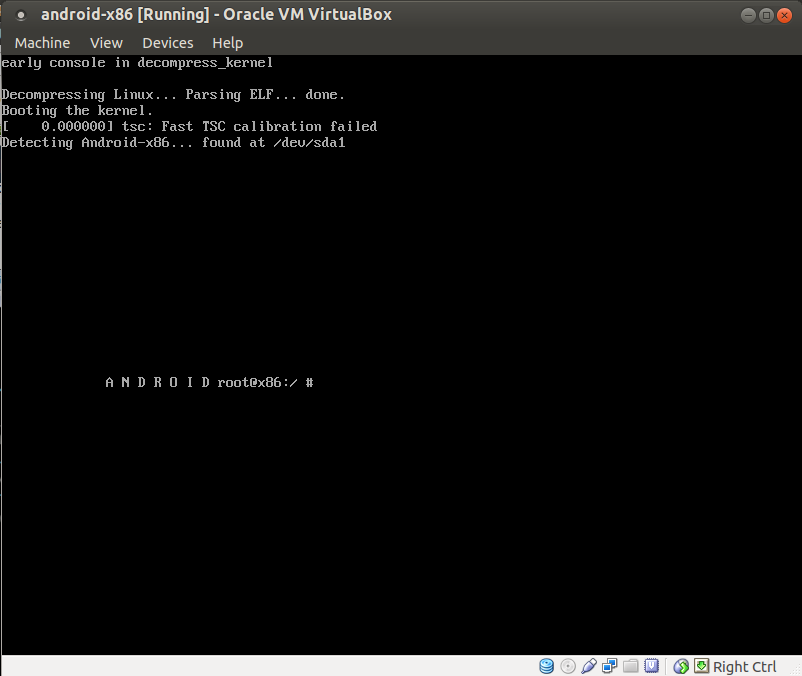
    Here is the snap shot of adding Android on virtual box.


    After Installation is complete, reboot it go to devices > CD/DVD Devices remove disk from virtual drive so as to boot normally inplace of getting booted from ISO.


    Wednesday, 26 June 2013

    "xournal" an excellent pdf editor for UBUNTU

    I was looking for a pdf editor in linux and  found xournal. This is excellent pdf editor and easy to use.
    you can install it by command

    • sudo apt-get install xournal
    After it is installed open the pdf file which you want to edit, after you are done you can also export it into pdf.


    Thursday, 13 June 2013

    My experience - "Member of the panel discussion" at an International Conference

    It was two day Conference on 12th-13th June 2013, at Sofitel Hotel, BKC on "The Global high on Cloud summit". It was related to cloud computing and we have recently started a research activity on "Mobile Cloud Computing", so our group head suggested to attend this and get an insight about how the industry is adopting cloud and what issues and challenges are they facing.
    On the morning of 13th the session started and I entered into the conference room, looking for a comfortable place to get seated and settled, the moderator of panel discussion had already initiated a panel discussion and this time members were not preplanned, as a Prof of class he started calling up the delegates randomly, my colleague and me were sitting at the last seat, in the age,experience and designation we were the junior most barely having 6+ years of total experience and months of experience in the field of cloud computing, while mostly the CIO's, CTO's, Executive Directors, MD's and all exalted dignitaries that everyone aspire to get added with his name, were present from renowned Industries like IBM, Oracle, Hero Moto Corp, Maruti Suzuki India Ltd, Essar, Sify etc .
    Suddenly the moderator asked me to join the panel at the stage "oh No"  I whispered as it used to be in the MBA classes (no not me ;)), but this was not the class, I could not say NO I am not prepared or how can I join with u all luminaries, I had to suppress my nervousness and get up with confidence.
    I got seated at the Dias with 5 other panelist the Director New India Insurance,  Executive Director – IT, JM Financial Services Ltd etc etc. Fortunately they did not asked me to initiate the discussion and one of the member started with what challenges are they facing, which are the issues need to be addressed and issues related to continuity, disaster recovery, availability and security while two of them were talking I got some time to prepare my speech, had a deep breath and gear up. As soon as the second guy finished the moderator said "Let us have the privilege to hear something from the lady ".
    After my introduction I started with "As you  rightly said about the mobile reaching right up-to the "Paanwala", I would like to continue from there, the mobile has reached to masses but computer has not reached yet, we are looking forward for a solution that can bridge this gap and this is possible with the help of "Mobile Cloud Computing", So the vision is to allow everyone to use their mobile  as if they are using a computer system and the solution should be intelligent enough to identify the kind of device, bandwidth, network connectivity etc and scalable enough to match the capacity of the cloud, dynamically call the services of the cloud on to the mobile and  on the top of that it has to act like a plugin so as to become convenient for the user to install on his device, be it a low end mobile or high end tablets, For example I should be able to access all the features of Microsoft Power point from my mobile/ tablet itself in the way it works on desktop/laptop" . I brought a lot of questions to be answered and was counter argued by the other members as most of them were having their own cloud set up and they were trying to relate with the client server or thin client kind of architecture for mobile, then I had to convince them how different and usable it would be from client server, definitely a market need to be identified for this but every concept has some niche at the beginning.
    Don't know what shape this idea is going to take in future but definitely I am happy that I was able to express my self, could remember something which my group head used to discuss and those exhaustive and difficult research paper from Berkley university had left some impression into my mind :)

    Thursday, 25 October 2012

    Data replication with Postgresql and Slony using pgAdmin

    1. Slony-I – introduction:
          Slony-I is a "master to multiple slaves" replication system for PostgreSQL supporting cascading        (e.g. - a node can feed another node which feeds another node) and failover.
         The big picture for the development of Slony-I is that it is a master-slave replication system that     includes all features and capabilities needed to replicate large databases to a reasonably limited number   of slave systems. Slony-I is a system designed for use at data centers and backup sites, where the   normal mode of operation is that all nodes are available.
    1. Tools: Postgres-9.2, PgAdmin 1.16, slon version 2.0.7 on UBUNTU 12.04
    2. Database setup
      The data will be replicated from database source ,public schema with table emp_details to to target databse,public schema and emp_details table.
      User is postgres, host=localhost both the database are on the same machine (same host and port)

    3. Replication Process with PgAdmin
      Create to database “source” and “target” .
      Create a schema-only dump of the source database, and load it into target.
      Everything has to be done into the Replication items inside the two newly created databases. The two replication objects need references to each other .


       1- Create base replication objects

    For the Master :
    • Right click on source > Replication and choose "New Slony-I Cluster"
    • Join existing cluster : Do not check this !
    • Cluster name : choose a name, here it is : REP_CLUSTER
    • Local Node Left : 1
    • Local Node Right : master_node
    • Admin Node Left : 99
    • Admin Node Right : admin_node
    • Press OK.
    For the Slave :
    • Right click on target > Replication and choose "New Slony-I Cluster"
    • Join existing cluster : Has to be checked
    • Server : localhost
    • Database : source
    • Cluster name : REP_CLUSTER (should be automatically recognized)
    • Local Node Left : 10
    • Local Node Right : slave_node
    • Admin Node : 99 - admin_node
    • Press OK.
    2 – Create path setup
    For the Master :
    • Right click on master_node Path and choose New path
    • Server : 10 - Slave Node
    • Connect Info : host=localhost port=5434 user=postgres password= “” dbname=target
    • Conn retry : 10
    • Press OK.
    For the Slave :
    • Right click on slave_node > Path and choose New path on target
    • Server : 1 - master_node
    • Connect Info : host=localhost port=5434 user=postgres password=”” dbname=source
    • Conn retry : 10
    • Press OK.
    Similarly create path for each node (slave on source and master on target)
    3 – Define replication set on source
    • In the Db source > REP_CLUSTER create a Replication Sets and choose new Replication Set
    • ID : 1
    • Comment : Replication Set 1
    Now we choose the table we want to be replicated from source to target .
    • In the Replication Set 1 choose New tables
    • Table : Any table of your choice e.g public.details (You will have to select table from the list that you want to replicate.)
    • ID : 1
    • Index : Auto filled when choosing table. That’s important to have a unique constraint on the table you want to replicate (primary key for instance).
    • Comment : a nice comment
    • Press OK.
    4 – Create a new Subscription (screen caps below)
    • Source >Replication Set > Subscription and choose New subscription.
    • Origin : write “1”
    • Provider : Choose “1 - Master Node”
    • Receiver : Choose “10 - Slave Node”
    • Can forward : Keep it unchecked
    • Press OK.
    Now check path and listen are same in source and target of admin node .If not add master_node (slave_node), slave_node(slave_node) in the target as well .

    Start the replication

    Go to slon path
    /usr/lib/postgresql/9.2/bin bin (or any other location depending on your linux flavour and / or Postgresql installation path). Check that slon is there in the path. This is the slony daemon you will start twice : one for the MASTER(source), the other for the SLAVE (target).

    slon syntax :

    slon [Options] [ClusterName] [ConnexionInfos]

    For the Master :
    • ./slon -d 1 REP_CLUSTER "dbname=source user=postgres host=localhost port=5434"
    For the Slave :
    • ./slon -d 1 REP_CLUSTER "dbname=target user=postgres host=localhost port=5434"
    Refer to the sample output of source and target .

    Test the Replication
    Add some data in the details table of source database and check whether it is replicated at the target.

    Reference:

    Wednesday, 17 October 2012

    Upgrading pgadmin3 from 1.14 to 1.16

    The Ubuntu 12.04 package manager will install pgadmin3 version 1.14 which does not support PostgreSQL 9.2.

    Warning:
    The server you are connecting to is not a version that is supported by this release of pgAdmin III.
    pgAdmin III may not function as expected.
    Supported server versions are 8.2 to 9.1.


    Remove the current pgAdmin version


    sudo apt-get remove pgadmin3


    Install pgAdmin version 1.16 using a ppa


    sudo apt-add-repository ppa:voronov84/andreyv
    sudo apt-get update
    sudo apt-get install pgadmin3

    Monday, 15 October 2012

    Solving the problem of browser and open office after upgrading UBUNTU 12.04 FROM 11.10


    After upgrading UBUNTU 11.10 to UBUNTU 12.04

    I was getting following error while opening any browser and open office


    Error: in load: file "/usr/share/uim/lib/sigscheme-init.scm" not found
    Error: in load: file "/usr/share/uim/lib/sigscheme-init.scm" not found

    To rectify the issue I installed the following package 


    sudo apt-get install --reinstall libuim-data

    Friday, 28 September 2012

    Troubleshhoting while upgrading UBUNTU 11.10

    While trying to update to UBUNTU 11.10 I was getting following error:

    W:Failed to fetch http://archive.ubuntu.com/ubuntu/dists/dapper/main/source/Sources

    All I did I opened /etc/apt/sources.list and commented the following lines :


    deb-src http://archive.ubuntu.com/ubuntu dapper main multiverse
    deb-src http://archive.ubuntu.com/ubuntu dapper-updates main multiverse
    deb http://archive.canonical.com/ lucid partner
    deb-src http://archive.canonical.com/ lucid partner
    
    
    Then System >Administration >UpdateManager 
    
    
    Click Upgrade.Follow the on-screen instructions.

    Sunday, 22 July 2012

    Upgrade pgadmin ubuntu

    You can upgrade pgadmin to it's latest version by using following command.


    1. sudo apt-add-repository ppa:flexiondotorg/postgres
    2. sudo apt-get update
    3. now you can upgrade from synaptic or use sudo apt-get install pgadmin3 to install the latest version.